Your cricket passport
GK Player ID
One unique identity that follows you across every match, squad and tournament.
What it is
A unique ID for every player.
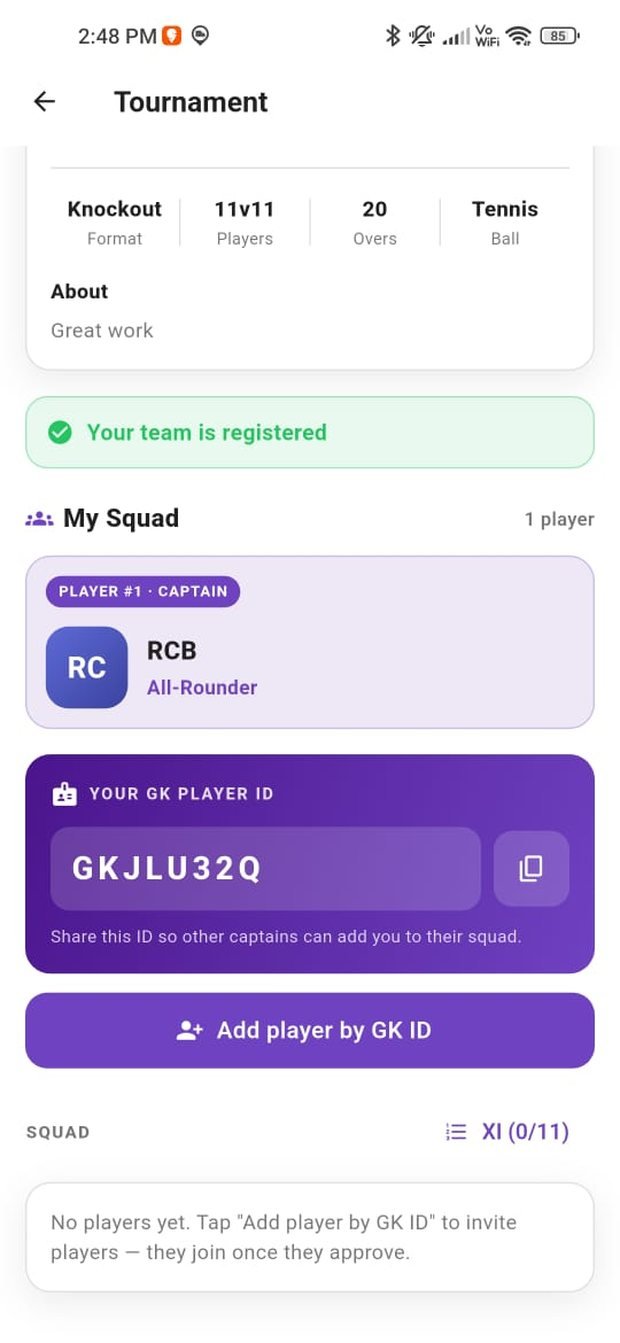
When you sign up, GullyKings issues you a unique GK Player ID — a short code like GKJLU32Q. It’s yours alone, and it’s how the rest of the community finds and verifies you.
Instead of hunting for phone numbers or guessing which “Rohit” is the right one, captains simply search your ID. No duplicates, no confusion, no wrong player added to the squad.
GullyKings
GK Player ID
GKJLU32Q
The invite flow
How a player joins a squad.
Nobody is ever added to a team without their say-so. Here is the full journey, from invite to approved squad member.
1. Share your ID
Your GK Player ID sits in your profile. Share it with a captain, or let them search for it.
2. Captain invites
The captain enters your ID and sends a squad invite. You get a notification instantly.
3. You approve
Accept or decline. Only you can add yourself to a team — consent is always required.
4. You’re in the squad
You appear on the squad sheet and get every match update for that team.
Captain workflow
Build a squad you can count on.
As a captain, your squad screen is the control room. You can see who’s approved, who’s still pending and who has declined — all before you commit to locking a fixture.
A
Create your teamName it, add a crest and you’re the captain.
B
Invite by Player IDSearch each player’s GK Player ID and send the invite.
C
Track approvalsWatch invites move from Pending to Approved in real time.
D
Pick your XISelect from approved players and lock the match with confidence.
Player ID questions
Can I change my GK Player ID?
Your GK Player ID is permanent and unique to your account, which is what makes it trustworthy. Your display name and profile details can be edited freely at any time.
Is it safe to share my Player ID?
Yes. Your Player ID lets captains send you an invite — it does not expose your phone number, and it cannot be used to add you to a team without your approval.
Can I be in more than one team?
Yes. You can be an approved member of several squads and choose which matches to play.
What happens to my ID if I delete my account?
Your account and its associated data are removed as described on the Delete Account page.